
UI and UX are perhaps two of the most confusing things, right up there with turtles and tortoises (seriously, how do you tell them apart?).
If you’ve ever wondered whether you need a UI or UX designer, or both, you’re not alone. The two are closely connected, but they solve different problems. Let’s go into some details to better understand this concept.
UI vs UX Design
- Difference Between UI & UX
- UI & UX Design Principles
- UI vs UX Design Process
- How UI vs UX Work Together?
- Should You Hire a UI or UX Designer?
The table of contents makes it look all over the place. But worry not, the explanation below is as simple as it gets.
What Is the Difference Between UI & UX?
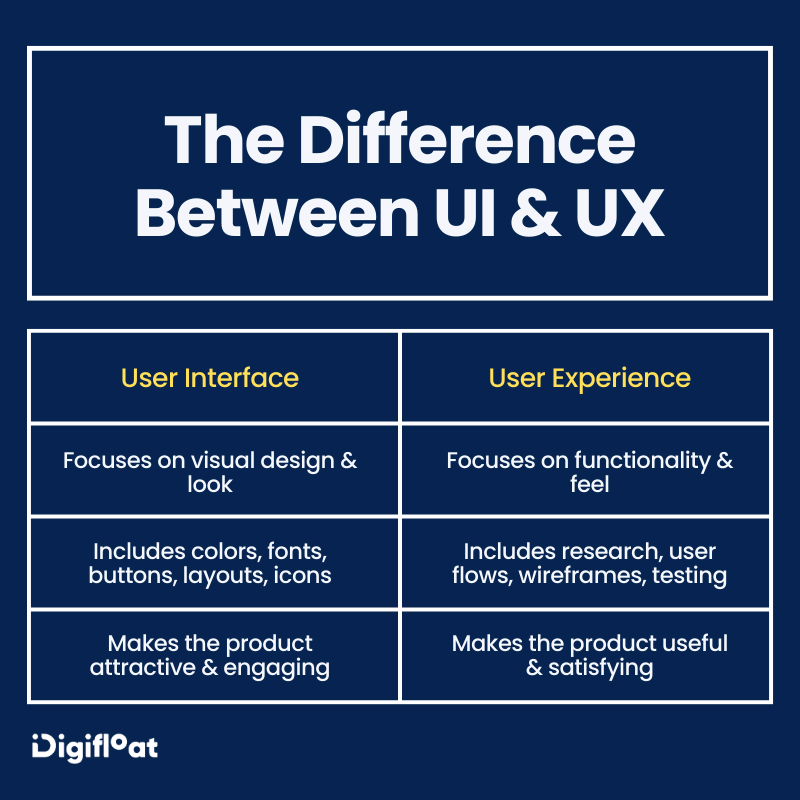
UI is how something looks, while UX is how something works.
This is the basic distinction between UI vs UX design, but let me explain it a little more.
UI (User Interface) is what you see and interact with when using a website or app. It includes things like buttons, colors, text, images, menus, and the overall layout.
UX (User Experience) is how a website or app works and how easy it is to use. It focuses on making sure users can find what they need and complete tasks without confusion.
UI & UX Design Principles
Design principles are basically a set of rules or guidelines that help designers make better design decisions. Both UI & UX follow these principles to create products that are easy to understand and enjoyable to use.
UI Design Principles
Since UI design focuses on creating an effective and user-friendly interface, its principles include:
1. Visual Hierarchy
Visual hierarchy is the arrangement of various elements based on their importance. The purpose is to guide the user's attention, so they know where to look first and what to look at next.
For example, on a landing page design, the main headline has a bigger font size than the subheadings and CTAs. It’s intentional so you look at the main message first, understand what the page is about, and then move on to the supporting information and actions.
This rule applies to everything, including the spacing, colors, alignment, and even the negative space.
2. Consistency
Consistency states that your interface should appear and behave in a similar way throughout a user’s interaction. The button you use on your landing page should be the same across other pages and screens. This makes the interface easier to understand and use.
3. Simplicity
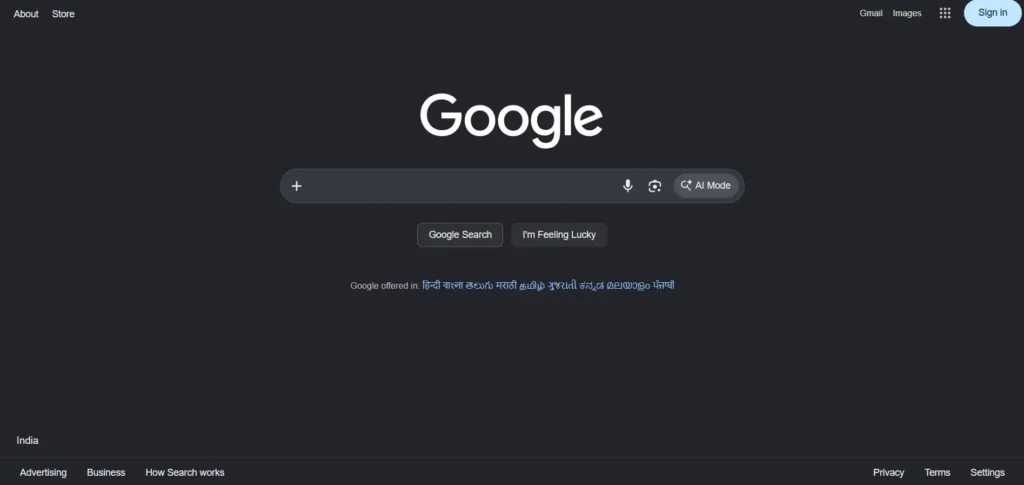
A good UI design is simple. It doesn’t clutter the interface with unnecessary elements, information, or decorative details. Instead, it focuses on providing everything the user needs in a clear and organized way.
Google is perhaps the best example of a simplistic UI.
4. Feedback
Feedback means letting users know what happened after they interact with something. So anytime they click a button, submit a form, or make a selection, the interface gives them some indication that their action was received.
For example, if a user clicks on a button, it could change color or show a loading animation, or if they submit a form, it shows a confirmation message to let them know it was successfully submitted.
5. Accessibility
Accessibility is one of the most important UI principles as it focuses on designing an interface that is usable by all individuals, including people with disabilities. This involves incorporating various practices such as:
- providing alt text
- ensuring compatibility with assistive technology
- using sufficient color contrast, etc.
UX Design Principles
There are certain principles, such as consistency and accessibility, that overlap when talking about UI vs UX design. However, UX also has its own set of principles that include:
1. User-Centric
The users should be at the center of everything you create. This means every button, slider, menu, and form needs to be designed with the user's needs, behaviors, and goals in mind.
It’s done by identifying their pain points, observing how they interact with a product, and gathering continuous feedback through interviews or surveys.
2. Usability
Usability means how easy it is for a user to use your product. Ideally, the interaction should be smooth, intuitive, and efficient, so users can accomplish what they came to do without confusion or frustration.
Say a user wants to inquire about the price of your services. They should be able to find the right contact form, chat option, or email address to submit their questions without any hassle.
3. Hierarchy
Similar to UI design principles, hierarchy in UX design refers to the visual arrangement of elements on a page. So the most important elements appear bigger and at the top of the page, and then you guide the users to the second and then the third steps in a logical flow.
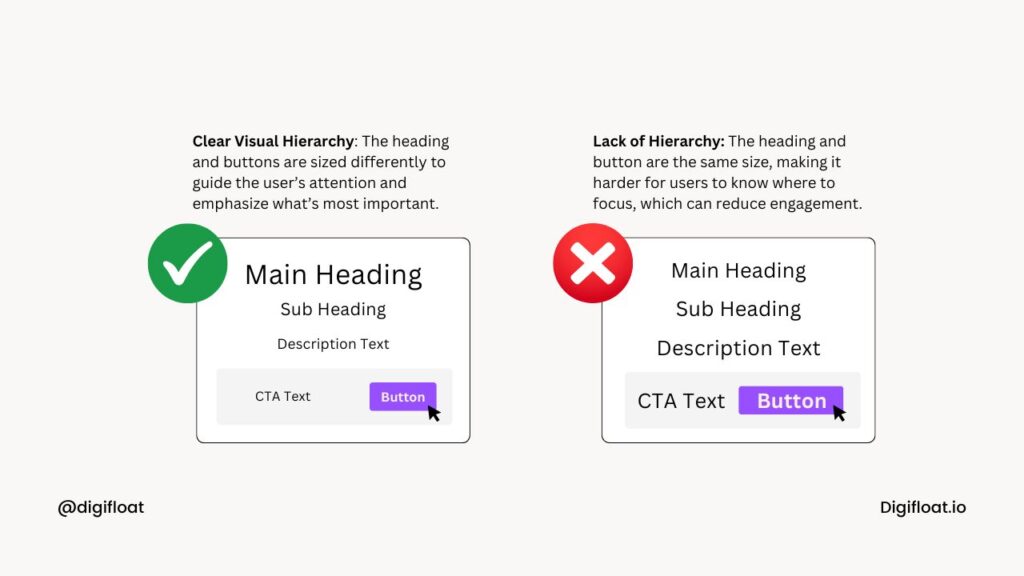
The most obvious way of doing this is by increasing and decreasing the font sizes. But you can also use colors and add visual cues (icons or arrows).
4. Context
Context is a bit of a complicated UX design principle. It states that the design experiences should be relevant to your users’ current situation, needs, and environment. This means understanding where, when, and how they will interact with your product and then tailor the content, features, and interface accordingly.
For example, you’re looking into how to design an app for runners. It would be used during their run in different environments. Therefore, it would need larger buttons and simple navigation.
5. User Control
User control gives users the power to make decisions while interacting with your product. They shouldn’t feel forced into actions that cannot be reversed. So if a user deletes something, they should have the option to recover it. If they open a menu, they should be able to close it whenever they want.
6. Confirmation
Confirmation involves confirming an action before implementing it. From the previous example, if a user clicks delete, they should see a confirmation message like "Are you sure you want to delete this?" before completing the request.
This prevents mistakes and also gives users confidence in performing the desired action.
UI vs UX Design Process
Unlike their principles, the UI and UX design process is very different. It always starts with UX because you want to understand the users and figure out how the product should work before creating a visual and interactive interface.
However, I’d say the best approach is to go back and forth between them as you test ideas, identify problems, and make improvements.
A typical UX design process looks like this:
1. Define the Problem
Ask yourself – Why does this product need to exist in the first place? What problem is it trying to solve, and who is experiencing that problem? This will help you outline the key objectives of the product.
2. User Research
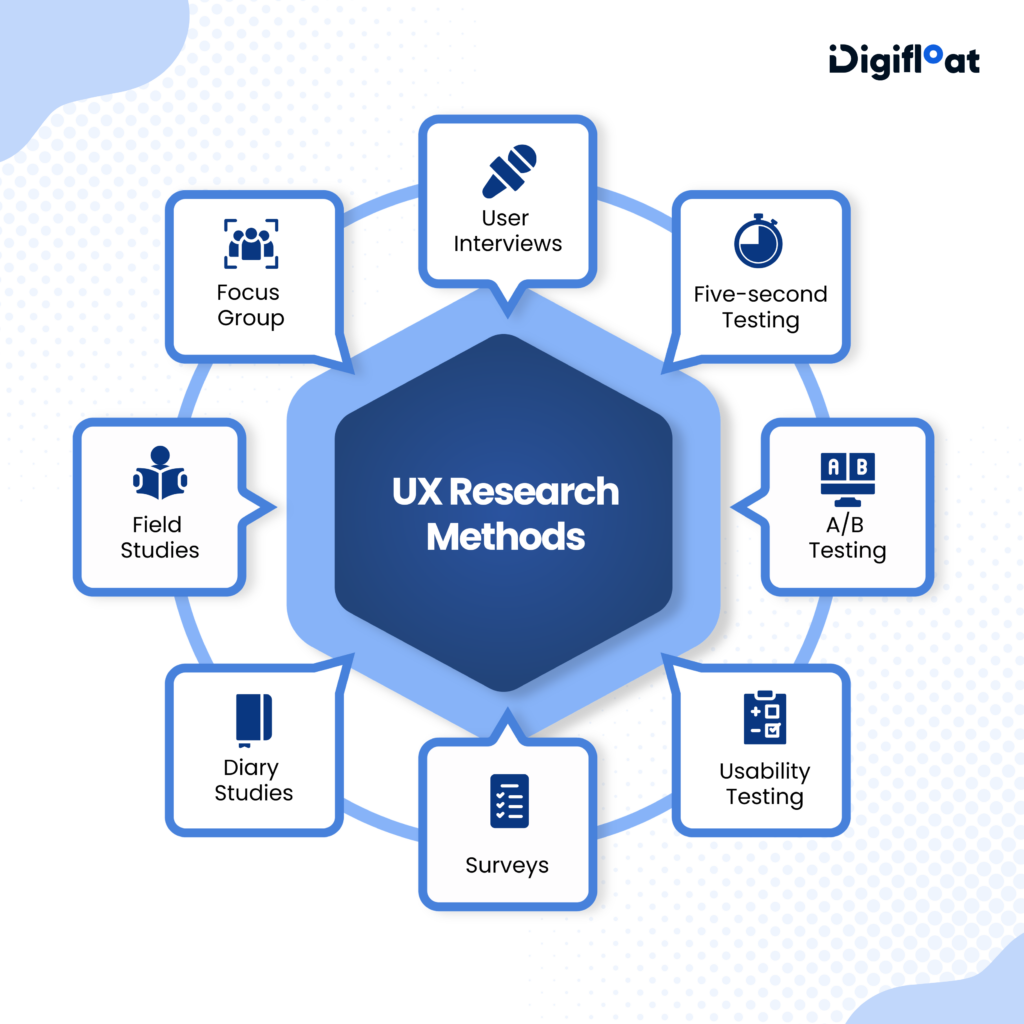
The most crucial step of UX design is user research. It’s where we discover who the users are, what they need, and what problems they are trying to solve.
The process is usually split into 2 parts – user research and market research. The former uses tools like surveys and interviews to uncover the needs, behaviors, pain points, and expectations of the users. The latter includes methods like competitor analysis and social media listening to understand the industry landscape.
3. Ideate the Solution
This is where we combine the insights from user research to explore different ways to solve the problem. It involves brainstorming different ideas and finally deciding which direction makes the most sense for the product.
4. Wireframing
A wireframe is a rough sketch where we first see how the product will look and work. So if you are creating a website, the wireframe will show the webpages, layouts, and navigation flow.
It’s never perfect and can be made just with a pen and paper. However, if you want to share with a team, use free wireframing tools online.
5. Prototyping
Once a wireframe is approved, it turns into an interactive prototype. These are more advanced versions that help test a concept and check functionality. So for a website, it’ll have clickable buttons, links, menus, forms, and other elements that allow people to experience the website’s flow.
6. Usability Testing
The prototype is put to the test with real users in focus groups or through an online testing tool. They are asked to complete simple tasks such as placing an order or filling out a request form.
The goal is to see how easily users can complete these tasks and identify any points where they get confused, stuck, or frustrated.
7. Improve and Repeat
Take the insights gathered during the testing process to refine and improve the product. It’ll help prevent major usability issues before development. But remember, this is a recurring step. You should keep testing, gathering feedback, and making improvements as you learn more about your users.
Now, a typical UI design process looks like this:
1. Understand the Requirements
A UI designer reviews everything gathered during the UX design process. It includes wireframes, user flows, and prototypes. This helps them understand project requirements and plan what actually needs to be designed.
2. Create a Visual Direction
Once the designer has a bigger picture of the product and its users, they start figuring out how the interface should look. This is where they establish the product’s overall visual direction before designing individual screens. They also start working on smaller details such as colors, typography, icons, buttons, images, spacing, borders, and other visual elements.
3. Design the Interface
The designer starts creating the actual interface with the help of an online UI design tool. This is where everything comes together. They create layouts, add various elements, and adjust the exact size, spacing, and alignment.
By the end of this stage, you have a near-perfect visual representation of the actual product.
4. Test & Refine
The final designs are put to the test to make sure the interface looks good and works as expected. It can be done in-house by designers, team members, and stakeholders. But it’s a good idea to involve real users.
Most online tools make it easier to share designs via a simple link. Figma is one of the most popular options, but you can also check out some free Figma alternatives.
How UI vs UX Work Together?
UI and UX are different, but they are also the two sides of the same coin. You don’t want your product to have stunning visuals (UI) but a clunky, confusing flow (UX).
Think of it like a restaurant: UI is the ambiance, and UX is the food service. One cannot shine without the other. You need great décor with excellent service to create a truly memorable experience.
Should You Hire a UI or UX Designer?
This is the next big question once you understand UI vs UX design. Whom should you hire? The answer depends on what you need.
If you already know how your product should work but need help turning your ideas into a polished interface, look into how to hire a web designer. They will help you create the layouts, choose the right colors and typography, and design other interface elements.
If you’re still figuring out how the product should work, a UX designer will be more useful. They can help you understand your users, define the problem, plan the user journey, and test different solutions. In this case, you’ll have to create separate job postings for each role and hire two different designers to handle both sides of the project.
But there’s also a third option!
There are companies that offer unlimited UI/UX design services. You won’t have to manage a team yourself; you can simply hire an agency at a fixed monthly cost and keep sending UI or UX requests as they arise.
Summing Up: UI vs UX Design
UI and UX are two essential pieces of the puzzle. It will surely be overwhelming to understand them individually, but as you learn more about how they work together, the difference starts to become much clearer.
Do you need help designing both? We offer an unlimited graphic design subscription that covers UI/UX design and 110+ other creative services. Just sign up and start submitting as many design requests as you need for one predictable monthly fee.



0 Comments